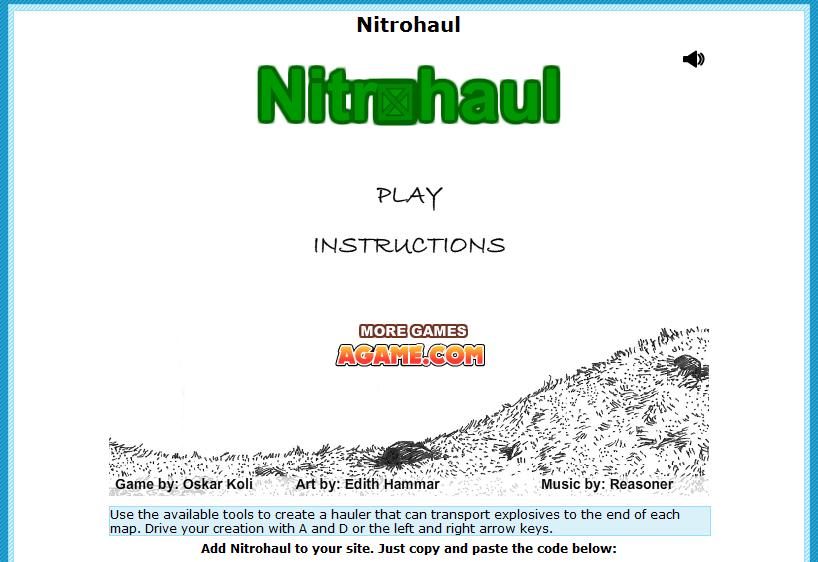
Nitrohaul has been a popular game around the library this month. It is a physics based game where players need to use the available tools to create a hauler that can transport explosives to the end of each map, with various terrain issues along the way.
You are currently browsing the archive for the Gaming category.
Games for the Brain is a website of quiz, memory, and brain games. A great site to let students explore and play. An ‘All language’ tab is available to change the text to any language, so LOTE and ESL classes can use this site for teaching and learning also.
Jane McGonigal spoke at a TED conference in February 2010 on how gaming can be used to make a better world. This was a very controversial talk (as can be seen by the online comments).
Gaming could engage students in learning who are failing to achieve the required standards, yet in games are achieving fantastic results. Acknowledging their games and the skills required to play them may be a start. McGonigal talks about Wold of Warcraft, a game that requires great collaborative and problem solving skills where gamers are working to the best of their abilities. It wouldn’t hurt to let a student show the class how a skill they are learning, such as collaborating, is used in a game they are playing. Using components of games, such as exciting epic stories, can be a way to introduce a classroom activity that requires solving a real-world problem. Using web 2.0 tools that allow for global collaboration builds the collaborative community, and allowing students to achieve small goals along the way, may maintain their interest. Embracing gaming is embracing a student’s interest and learning strengths.
‘Lyn finds fun plus learning equals smart kids’ is an interview by the Melton Weekly with the inspirational 2011 Victoria Teachers Credit Union Outstanding Primary Teacher Award Winner, Lynette Barr. Lynette is a teacher at Rosyln Primary School and uses 3D games to provide engaging, authentic learning experiences for her students. Lynette explains how teaching needs to reflect the needs of the students:
You can also view Lynette’s presentation ‘Improving student engagement and relationships’, that was part of the 2010 Innovation Showcase, below:
During the month of May, the game that appeared most often on the screens of the students’s computers at Mooroopna Secondary College’s Library has been Wooden Path 2. It is a logic game where the player has to make a wooden path across the river and move through magical lands. It is a fun game to play, besides the fact that it is in coolmath.com, a student-friendly game site allowed at the school. Check it out, and suggest it to maths teachers and any students looking for something to do of a lunchtime.
Digital Play is a blog by Kyle Mawer and Graham Stanley that provides computer game activities and ideas for, specifically, EFL/ESL teachers to use with their students. Any educator, however, would find something useful on this blog. Their latest post ’10 gaming genres to adapt in class’ provides the gaming genres (such as point-and-click, arcade, and puzzle) and information on how they will help build language skills, with examples of particular games to be used in the classroom.
The blog also provides lesson plans for gaming, that are very indepth plans to bring gaming into the classroom. The plans often include the level, topic, language focus, location for gaming, game details, prepartion, and tasks related to the game. Digital Play is a truly fantastic resource that should be explored and shared with teachers in your school.
March has continued to see tower defense games being played in our secondary school library before school and at lunchtimes (and during class time if they can sneak it). Bloons Tower Defense has taken a back-seat this month to Plants vs Zombies. This game is free, has 50 levels, and five game modes:
As the promotors say ‘Get ready to soil your plants!’. This is a fun game where the player needs to defend their home from Zombies, using plants that each have their own defensive and offensive capabilites. Although this may not be your cup-of-tea, it is good to know what the students are playing to open-up conversation. For example, I’m sure the students would have something to say if you walked up and asked if they have planted any Scaredy-Shroons to stop the Zombies from eating their brains (just make sure they are the students who play these games first!).
NB: Students at Mooroopna Secondary College (Victoria) are able to use the library before school, at lunchtime, and after school to play games as long as these are not deemed to be violent by the staff.
Coolmath-Games.com is where students can play games and learn math skills at the same time. The site has something for everyone, from learning how addition works (some activities are for children to do with their parents), to being taught about algebra and precalculus. A note of warning for the lessons the site offers, you cannot download or print these lessons. That does not stop you from showing them on the interactive whiteboard. The homepage has new games listed, and you can search by category, such as strategy, numbers, and memory. It is definately worth exploring and sharing with the math teachers.
Games in Education is a brilliant wiki by Adrian Camm (educator, innovator, presenter). As Camm says on the site, “Using gaming as a vehicle for learning is a very powerful idea and one that is under-utilised”. Gaming is possibly under-utilised because many eductors do not know the games that will help students learn and be something that the students are interested in playing. Enter Games in Education. The wiki provides lists of games to suit particular learning areas, such as mathematics, literacy, and global issues. Suggested year levels for each game, how the game relates to the curriculum, and links to further information make this wiki such a great resource. Have a look at the ‘Game Creation Tools’ to get your students creative juices really flowing. Camm also includes current research into gaming and education. You can add to this wiki and if you have any questions Camm provides his contact email on the main page. So, no excuses. Let your students and yourself have some fun, and get gaming.
Knowing what students are playing helps when trying to connect with them. You can suggest good games to play and let staff know of any games that relate to their key learning area.
During February students have been madly playing Bloons Tower Defense. They play it before school, at lunchtime, and any chance they get. This is a strategy game where the player needs to stop the Bloons from going through the maze. Players stop the Bloons from leaving the maze by building and upgrading the Bloons popping towers, through the money the accumulate when they pop a Bloon. Created by NinjaKiwi, there are 50 levels to keep the players happy.
If you need help to find appropriate games and to embed them into the curriculum, you cannot go past Kelly Tenkely‘s excellent blog ilearntechnology.
Kelly is a passionate and dedicated elementary (primary) teacher who has developed the most amazing collection of games and written about their educational applications. Check out her blog. You won’t be disappointed.
A couple of new YA fiction books about gaming have recently been published and are must reads for teacher librarians, library staff, teachers, parents and of course young adults themselves.
I recently read and reviewed For the win by Cory Doctorow. Covering a global approach to gaming, much of this book is actually based in fact. It’s quite scary to think that economies are influenced by the invisible and virtual gaming economy and that young adults can earn more money from gaming than their currently parents earn. For the win is available in paperback or ebook format and the ebook download is free. My review is here, thanks to CMIS.
Helen Boelens alerted me to another new book, this one by Salman Rushdie. Helen explains that “Luka and the Fire of Life makes references to Super Mario and there is a strong connection between the story and the video game.” Information about this book from The Huffington Post is available here and a review by The Guardian is available here.
It seems (and it is) a long time ago that Space Demons was published. However I think that these books are an excellent way of discussion and coming to terms with gaming and how it affects our young adults. We can build on this information. Remember that the 2010 K12 Horizon Report assessed gaming as becoming mainstream in education in 2-3 years. One of those years has almost passed.
The United Nations International Strategy for Disaster Reduction brings you and your students the Stop Disasters game.
The aim of the game is for students to learn how they can stop disasters from occurring. The FAQ page explains more:
Who can play the Stop Disasters game?
Anyone with internet access can download and play the Stop Disasters game from this web site. The game will not be ‘downloadable’ as an exe file on your hard drive. Instead it will load into a browser window.Do I need a special computer?
No, any computer built within the last few years will be sufficient – Mac, PC or Linux based, with a screen resolution of 800×600 pixels.You’ll need an up to date browser, with Flash Player version 7 or higher. You can download the latest Flash plugin from here:
http://www.adobe.com/go/getflash/How long does it take?
Each scenario takes between 10 and 20 minutes to play, depending on the disaster you are trying to prevent and your skill level. There are five scenarios to play, and each can be played on easy, medium or hard difficulty levels.What age do you need to be to play?
The core audience is 9-16 year old children, but anyone can play and enjoy the game, and everyone will learn more about preventing disasters.
The game is available in English, Spanish, Chinese, French and Russian, which makes it excellent for language classes.
A series of fact sheets for teachers have been developed and include:
- Tsunami Fact Sheet
- Hurricane Fact Sheet
- Wildfire Fact Sheet
- Earthquake Fact Sheet
- Flood Fact Sheet
There are also videos and links to other resources.
A fun way to teach students about natural disasters, but also to demonstrate that they have the power to help minimise or stop them occurring.
Any school studying forensic science will probably be interested in this site.
Funded by the US National Science Foundation in conjunction with other organisations, CSI: The Experience Web Adventures provides three adventures, one each for beginner, intermediate and advanced. Registration is free and players can either sign up or play as a guest with no login (this means you won’t be able to save your game to resume playing at a later date). CSI characters help guide you through the adventure and offer help when needed.
This could be a good site for language learners as adventures are available in German and Spanish as well as English.
There are a number of resources for educators for students at different levels, a family guide, as well as links and other activities. Please check the site out before using with students as the nature of crimes involved may not be appropriate for everyone.
Thanks to Richard Byrne from Free Technology for Teachers for supplying the evidence!
Recently the UK’s Futurelab organisation published a report about ‘the benefits and risks to children’s wellbeing and learning associated with playing computer games.’ As most of us either have children or relatives who are children who play computer games and/or are considering introducing or have introduced gaming into schools, this report will be of interest.
questions addressed included:
- What role do computer games play in the social, leisure and informal learning activities of families (parents and their children)?
- What are the attitudes and perceptions of family members towards the benefits and risks of playing computer games?
- How can we support parents and their children to appreciate and understand the benefits and risks associated with playing computer games?
Three documents outlining the project and results are available.
One of the key findings was
Parents and young people, that is, those aged 5-15, perceived that there were benefits to playing video games as a family, with the main motivation being enjoyment.
The important aspect of this is communication and connectedness within the family for building and maintaining good relationships. This should be applicable to school as well.
To help engage and enhance student interaction at the VCAL level (alternative year 11 and 12), Preston Girls’ Secondary College teachers Les Kyle and Judith Way have developed wiki that houses a unit of work based on the wildly popular Guitar Hero video game.
While the main foci of the unit are literacy and numeracy, Les and Judith hope other skills will come out of the program. The program will begin in term 1, 2010. Les and Judith explain:
Introducing literacy and numeracy at senior years is always difficult. It always needs to be embedded into types of work the students find interesting and what better way to get the students’ attention by using Guitar Hero as a starting point.
Upon forming their ‘bands’, students will be blogging about imagined tours, CD releases, booking and travelling to venues around the world and so on. Numeracy skills come into play when deciding who much to pay roadies, how much tickets will cost and how the money will be split between the band. Students will need to be aware of their audience when blogging and develop a convincing history of their band.
Other skills such as cooperation and collaboration, problem solving, researching and investigating, mapping and creativity. Students will also be learning how to use web 2.0 tools such as Big Huge Labs to create posters, tickets and CD covers. Voki or other sites will be used to develop avatars and students may film their ‘concerts’ to upload to teachertube.
We hope that this unit of work will grab the students’ imagination and keep them actively involved for the entire time.
(With thanks to staff at Perth and Kinross Schools in Scotland for the seed that developed into this wiki.)
Hopefully the students enjoy their numeracy and literacy lessons! It will be interesting to hear how it all goes.
The Apple iPad has landed. At 5am this morning (Melbourne time) Apple launched their latest creation, the iPad. It looks like a large iPhone or iPod touch.
It has a 25 CM display screen. One really cool demo covered the New York Times where users can read a copy that is laid out exactly like a real newspaper. It also has embedded video to add to the stories and menus to access other pages quickly.
A full size keyboard pops up when you use it in landscape. It has high definition video and lots of application for gaming. Photos can be added directly to Flickr and Facebook.
But the big thing for us guys is iBooks. The iBook store is on the iPad and Apple have already partnered with Penguin, Macmillan, HarperCollins, Hachette and Simon and Schuster. Interestingly some prices for books were pictured during the launch. Although in US dollars, Twilight and The Lovely Bones were listed at $4.99. That’s very appealing. Obviously a full colour screen so covers display as per the real thing. Fonts can be changed and enlarged to suit individual readers.
Bad news though; iBooks is apparently only available in the US upon the release in March. This is a serious problem for any Apple market outside the US, but understandable really due to publishing territories. Wonder when other territories will come onboard? No doubt this will happen though, as iTunes wasn’t available to other territories at one stage.
But the most important and fairly basic question that we as library professionals and educators have to ask is will the iPad bring more people to reading? I think the answer is yes and surely that is what we are all about, what we strive for in our work every day.
iWork, a suite of applications has been added to the iPad. iWork includes speadsheets, documents and presentations and is compatible with Microsoft Office. The spreadsheets look amazing and a numeric keypad pops up for data entry. These apps will cost (US) $9.99 each, whereas the iWork complete suite for Macs cost a$129.
As there will be a full sized keyboard dock for the iPad, it makes using the iPad as a regular computer so much easier.
The device weighs approximately 680 grams and according to my calculations is just over 1 centimetre thick. The iPad will come in 16, 32 and 64GB. There are WiFi and 3G models. The 3G are unlocked and should be able to use any carrier.
Pricing starts at US$499 for 16GB, $599 for 32 and $699 64GB WiFi models. 3G models add an extra US$130. The WiFi model will be on sale in 60 days, this availability is worldwide. We won’t have to wait here in Australia. The 3G model will be on sale in 90 days, but international pricing for plans or prepaid accounts will take until June or July to be locked in. As the 3G model has a Sim card tray, here’s hoping that we’ll be able to use the Sim card for mobile broadband access.
The pricing here is important in terms of the Kindle DX. Currently at A$489, the Kindle will face stiff competition from the full colour multi-faceted iPad. Will be interesting to see how the availability of book titles pans out on the iPad. Perhaps it is no surprise that a free Kindle app for iPhone and iPod touch was released today.
Apple’s specifications can be accessed here. A VoiceOver screen reader should mean that vision impaired people can use the iPad. It seems there is no camera for video conferencing or Skyping and the rumour of solar power was just that. The Engadget people covered the iPad launch event live, so for lots of news, photos and specifications, head over there. And here is a short video of the launch:
Questions about how the iPad may impact on school libraries are pondered here.
Here is the official Apple video of the iPad.
This article appeared in yesterday’s Herald Sun. More and more academics are doing research in relation to the benefits of video games and the relationship between video games and learning.
By Greg Thom, From: Herald Sun, December 10, 2009 12:00AM
Helping: Academics say video games can be good for kids. Daniel, 8, and Ashley, 10. Children.Picture: Ian Currie Source: Herald Sun
PLAYING video games may help boost crucial social skills needed by pre-school children to help them succeed later in life.
Childhood development experts suggest fun games, which encourage teamwork and friendship, can lay the groundwork for positive interaction between children, leading to better behaviour and academic results.
They say parents’ obsession with ensuring children can read, write and count before reaching primary school can lead to a lack of emphasis on developing social skills.
Children who are socially successful at school are more likely to enjoy it, have a positive outlook on learning, display higher self-esteem and develop good coping skills.
Melbourne University childhood development expert Prof Michael Bernard said social competence had to be taught at home. He said many parents falsely thought children would reach primary school equipped to meet social needs.
“Some children come from home backgrounds where they never learn (playing naturally), and what’s important in the early years is to help up-skill them in social skills,” he said.
Children who did not know how to engage with others while playing would suffer later.
“If they don’t come to school with those skills, they’re at a very big disadvantage in terms of their emotional wellbeing,” he said.
Video games fostering social skills should be encouraged.
A recent paper prepared for the Victorian Curriculum and Assessment Authority by early childhood researchers Patricia and Don Edgar said video games could help children develop skills such as comprehension, decision making, collaboration and leadership. But parental involvement was crucial.
Examples of helpful games include Wonder Pets: Save the Animals, about three friends who rescue animals, and games based on the pre-school hit Dora the Explorer.
Sharendipity is a site that lets you create your own games and then upload them to the site, embed them into other websites or just use games that other people have developed.
Their website states:
Sharendipity is the fun and easy way to create fun, social games without programming that can be shared with your friends or embedded on your website. Or simply browse and play the creations of others, challenging your friends to beat your high score! Create a game in four easy steps or try the advanced game creator!
There is a wiki and a blog to assist if you need it as well as a forum to consult other Sharendipity members. Looks like fun for teachers and students alike.
If you are interested in gaming and handheld devices for learning, then you may be interested in the proceedings from the recent Handheld Learning Conference in London. Thank you to presenters and organisers for sharing both audio and video files from the numerous sessions.
| Proceedings |
Plenty here to keep you busy for weeks!
Hamish Curry, the Library & Online Learning Manager, Learning Services at the State Library of Victoria has kindly sent the following information:
I’d like to bring to your attention the programs we’re delivering for the International Digital Entertainment Festival (iDEF).
The full list of programs we’re delivering is available here, but highlights include -
- Friday Oct 30 – two schools programs featuring speakers Vincent Trundle from ACMI, and Dr Joanne O’Mara from Deakin Uni highlighting her research into ‘Literacy in the digital world of the 21st century: learning from computer games’
- Friday Oct 30 – a free screening of the gaming doco Second Skin, which will be its first screening in Australia, andintroduced by the Director Juan Carlos Pineiro Escoriaza.
- Saturday Oct 31 – a presentation about game development from the organisers of Freeplay
- Saturday Oct 31 – SYN and FReeZa present their 1Up Youth Gaming Tournament.
- Sunday Nov 1 – a forum ‘I’m a gamer and proud of it!‘ featuring James Dominguez from Screenplay, and Anna Dunne from Australian Gamer and Channel 31 show Level 3.
Certainly seems like lots of relevant and interesting sessions! Thanks Hamish for passing on the information.
This article was recently published in The Age’s Green Guide. Anyone remotely interested in gaming (or who have children who are) and are/or will be in Melbourne some time should consider visiting the exhibition mentioned. It is permanent and free.
JASON HILL
October 8, 2009
Part of the Screen Worlds exhibition.
From Pong to PlayStations, this exhibition covers the console evolution. By Jason Hill.
After a year-long renovation, the “new” Australian Centre for the Moving Image has opened its doors to the public with a free exhibition that prominently features video games.
The new permanent Screen Worlds exhibition charts the history of screen-based entertainment, from cinema’s early beginnings to the rise of television, games, the internet, new media and the digital age.
ACMI has been exploring games culture since 2002 and enjoyed great success last year with the Game On exhibition, which attracted more than 150,000 visitors.
The head of exhibitions, Conrad Bodman, says games are “really embedded in what we do at ACMI. It is accepted that it is part of the creative practice that we’re looking at.”
He believes institutions such as ACMI can help legitimise games as an art form and a cultural force. “I kind of feel that games have already got a certain legitimacy at ACMI having done shows like Game On, which have underpinned the enthusiasm that games have cultural value,” Bodman says.
In the “Emergence” section of the new exhibition, visitors can get hands-on with the first ever console, the Magnavox Odyssey, as well as classic games such as Space Invaders, Tempest, Super Mario Bros 3, Tomb Raider and the pioneering Melbourne-made fighting game, The Way of the Exploding Fist.
The new Games Lab situated within the Screen Worlds exhibition also includes 14 computers and a selection of playable games for solo or multiplayer action, including Quake, Tetris, Lemmings, Sensible Soccer, Pro Evolution Soccer, Civilization, Spore, Project Gotham Racing, LittleBigPlanet, Sonic the Hedgehog and Mario Kart. Bodman says choosing the featured games was a significant challenge.
“That’s been quite tough because we’ve had to be very selective,” he says. “Part of it is about the development of the genre, looking at past and present, and part of that is a technology story about how the technology has improved.
“We felt that it was important to add historical dimensions so people can understand where games have come from and also specifically look within the Games Lab at the game genre and how they have developed over a period of time.”
Games are presented on their original hardware wherever possible, despite the technical challenges of keeping 30-year-old machines running every day.
ACMI has also assembled a “significant collection” of Australian games, Bodman says. “Although that material is not going to be available to everyone who comes in, if you are a researcher and you are doing some specific work and looking at Australian games, you can borrow that material and view it within our research area that is part of the Mediatheque. There aren’t many repositories around for Australian games [and] it can be really difficult to find games in their original format. It’s important that ACMI represents that area.”
Another highlight is the Pong v Tennis game commissioned for the exhibition. One player uses a retro-style paddle and the other a modern wireless controller in a single game that Bodman hopes can showcase the “historical trajectory” of gaming.
Attendees should also look for the spotlight on Australia’s Krome Studios, one of the world’s largest independent video game developers.
ScienceDaily reports on a study that games such as Wii Sports are good for health:
ScienceDaily (July 17, 2009) — Scientists at the University of Oklahoma Health Sciences Center have found that playing active video games can be as effective for children as moderate exercise. The findings appear this week in the journal Pediatrics from the American Academy of Pediatrics.
While OU pediatricians don’t recommend children stop playing outside or exercising, the research shows that active video games offer a great alternative to moderate exercise for many children of today’s generation who are sedentary and at high risk for obesity and diabetes.
“These exer-games are no substitute for ‘real’ sports activities, but if kids play them as designed and stay engaged, they can burn several calories per hour above their sedentary level. We view any increase in energy expenditure (calories burned) as a good thing, especially in our overly-sedentary society,” said Kevin Short, Ph.D., principal investigator on the project.
To test the idea, researchers measured the heart rate, energy expenditure and self-reported exertion in children between ages 10-13 while they watched television, played active video games and walked on the treadmill at three different speeds.
Compared to watching television, the calories burned while gaming or walking increased 2- to 3-fold. Similarly, high rates of energy expenditure, heart rate and perceived exertion were elicited from playing Wii boxing, Dance Dance Revolution Level 2 or walking at 3.5 mph.
Wii bowling and beginner level DDR elicited a 2-fold increase in energy expenditure compared to television watching.
Overall, the energy expenditure during active video game play was comparable to moderate-intensity walking. Thus, for children who spend considerable time playing electronic screen games for entertainment, OU researchers found that substituting that time with physically active games can be a safe, fun and valuable means of promoting energy expenditure.
The study was funded by the National Institutes of Health and the Children’s Medical Research Institute.
Journal reference:
- Graf, Diana L., Pratt, Lauren V., Hester, Casey N., Short, Kevin R. Playing Active Video Games Increases Energy Expenditure in Children. Pediatrics, 2009 0: peds.2008-2851 DOI: 10.1542/10.1542/peds.2008-2851
Adapted from materials provided by University of Oklahoma.
Victorian Northern Metropolitan Region Ultranet Coach Anesti Anestis has provided Bright Ideas with information about a Games for Learning wiki.
Anesti explains, ‘It is a site to find, make and play games. Teachers involved in gaming can share their experiences and findings in applying games in the classroom.’
With information on
there is plenty of support for schools that are considering introducing gaming for learning.
Xperience XBOX
FRI 17 JULY, 6.30 – 9PM
Come in and experience some of the best XBOX 360 games with an evening of modern, multiplayer, and online XBOX 360 games, such as Guitar Hero: World Tour, Halo 3, Harry Potter and the Half-Blood Prince, Street Fighter IV, and Sacred 2. There’ll also be giveaways and opportunities to win major prizes*, including an XBOX 360 & games pack. All funds raised on the night will be going to benefit the Royal Children’s Hospital. So engage with XBOX 360 gaming and help others at the same time! Presented in association with OzBoxLive.
Experimedia
State Library of Victoria
FREE [Bookings required] *$5 payable per ticket for the prize raffle
Phone: 03 8664 7099
Email: bookings@slv.vic.gov.au
Online (via Eventbrite): http://xperiencexbox.eventbrite.com
The Bureau of Meteorology has copies (CD format) of the “Stormwatchers : a cyclone awareness game for children” available to give away. The game and further details can be found at: http://www.bom.gov.au/storm_watchers_game/ . If any school library would like a copy of the CD, please get in contact with Trevor Wakely by emailing T.Wakely@bom.gov.au and he’ll send you a free copy.
Rob Mercer, the ICT Outreach – Project Officer for the Faculty of Information & Communication Technologies at Swinburne University of Technology has sent out the following information which may be of interest.
I would like to announce that the SwinGame 09 games design competition is open again this year. The competition ran for the first time last year and our senior academic staff from the Computer Science and Software Engineering academic area were impressed with the quality of the entries. The winning games from last year can be seen at www.swingame.com
This year’s competition now includes two different categories (Arcade and Open) to encourage all secondary school students to enter and participate (visit the website for category details).
Once again, the SwinGame.com website will have the following supporting programs and materials to help students:
- The creation of Game Development Kits available in VB.NET, Delphi, Pascal, VB6 and C# to give students a range of tools and examples to assist in the creation of their game;
- Sample games which include tutorials with videos on how to create games;
- A forum where participants can ask questions, get help and post ideas about their games;
- A teacher only forum for teachers to discuss ideas and ask questions.Similar to last year, the 2009 competition is:
- Free to enter
- Open to individual students and teams of up to three
- Open to all secondary school students in AustraliaPrizes for the Arcade Category (team or individual):
1st Prize – $2,500
2nd Prize – $1,000
3rd Prize – $500Prizes for Open Category (team or individual):
1st prize – $1,000The competition is currently open and entries must be submitted by 7 August 2009 (see website). All entries will be judged by a panel of experts and winners will be announced on 16 August at Swinburne’s Open Day. This is a good way to get students from your school excited about software and games development, which will hopefully encourage younger students to choose IT as a subject.
A class presentation is available for your students on the SwinGame 09 competition which can help them get started. If you would like a Swinburne staff member to visit your class to present SwinGame, please contact me on the number/email below.
All information on the competition is available here:
If you have any questions feel free to contact Rob.
Bright Ideas recently came across this gaming program for students in years 9 -11 developed by Swinburne University of Technology. From their website comes the following information:
VBugs – Games Programming using VB.Net and SwinGame
Click here to access the online form.
- What is VBugs
- What is in the resource
- Who is it suitable for
- How much does it cost
- How long does it take to complete
- How to request the VBug resources
What is VBugs?
VBugs is a resource for creating a game using the SwinGame Software Development Kit (SDK) and VB.NET. Its aim is to teach students the steps involved in programming in a fun but non-superficial manner.
What is in the resource?
The downloaded resource has a teacher and a student folder. The student resource consists of self paced tutorials with exercise sheets for the student to fill in by hand as they progress. The exercise sheets have been designed as a way of assessing student knowledge and understanding of the topic as they progress. The teacher folder contains solutions to both the worksheets and the project chapter by chapter as well as lesson plans for using VBugs in class.
Who is it suitable for?
The resource is suitable for students from Year 9 – 11. The resource takes students through the very basics of games programming through to the development of a fully interactive game with levels, scores, music, sound effects, keyboard and mouse input and animated sprites. Students who are keen and progress well, can go on to develop another SwinGame and can enter in the SwinGame 09 competition. This competition is to open to all secondary school students in Australia. Visit the SwinGame 09 website for more details.
How much does it cost?
No charge. As part of Swinburne’s effort to support secondary schools and enhance the profile of ICT, this resource has been developed for all secondary schools to use for free. Simply register (see below) and we will send you the password and the link to download the resource in full. Along with this link we can send out a hard copy of the book for the teacher’s reference.
How long does it take to complete?
This will depend on your class to some extent. VBugs has 9 chapters. Some chapters would take approximately 1 period to complete and others about 3. The final chapter is open ended so if some students finish faster than others they can keep working on improving their game for as long as you like. We recommend allowing about 16 classes. A run down of the chapters can be found below:
- Chapter 1 – Hello World
- Chapter 2 – Images, Fonts and Colours
- Chapter 3 – Movement
- Chapter 4 – Sound and Keyboard
- Chapter 5 – Mouse input and Animation
- Chapter 6 – Methods in VB.NET
- Chapter 7 – Objects and Classes
- Chapter 8 – Level and Score
- Chapter 9 – Extensions and Additions
How to request the VBug resources?
After filling out the form, you will be emailed a username and password to access VBugs.
For anyone who is still unsure about the educational worth of videogames, here is a personal example of just some of the things I learned in a few days from a ‘G’ rated Nintendo DS game called Mystery Case Files: MillionHeir (showing in a Wordle word cloud).
This is not an advertisement for the game (Bright Ideasdoes not accept sponsorship or products), I purchased it with my own hard-earned dollars (approx. A$35 from JB HiFi). However, it is a lesson in how children (and adults) can be engaged in their favourite pass time and still learn many things that we would normally teach them in a more traditional manor. It is also a great activity to share with the family.
This game also has the ability for up to four players to either compete against each other or work cooperatively by using one Nintendo DS each, but only one copy of the game is needed. You can set time limits for tasks, set the number of hints for each player and the number of locations used in the game. In a nutshell, you can set the game to whatever level suits you or your students.
Using Case Files: MillionHeir in an English class, students could study the crime genre by writing back stories for the characters in MillionHeir, watching classic movies, read crime fiction, write their own crime stories, explain features of the genre, developed plans of the MillionHeir’s house, etc.
A very interesting article has been published in today’s edition of The Age Green Guide entitled Games ‘valuable learning tool’. Written by Jason Hill, the article says, ‘Education experts say computer games boost a range of skills in children’.
April 9, 2009
Education experts say computer games boost a range of skills in children, writes Jason Hill.
Computer games can be a positive learning tool for children as young as three, according to Australian education experts.
Patricia and Don Edgar, authorities on children’s media, education and social trends, recently wrote a paper for the Victorian Curriculum and Assessment Authority in which they argue that there is growing evidence that games are effective and valuable learning tools.
Skills developed from games include comprehension, decision making, multitasking, collaboration, concentration, leadership and communication.
Dr Patricia Edgar says it is not surprising some parents fear the impact of games on their kids, because many “fear the unknown” or are concerned about violence.
“Anyone with children knows how absorbed and passionate about games kids can become,” Dr Edgar says. “Parents worry about something that takes over their kids’ lives as games do – games which they can’t see much point to.”
Dr Edgar, whose latest book is titled The New Child: in search of smarter grown-ups, encourages parents to “sit with kids, let them explore and learn”.
“Parents have to put in the time. Then they will know the content of the games, and their involvement will help the kids to learn.”
Dr Edgar believes games can also have an important role in the classroom, although more research and investment is needed to produce educational games that enable kids to learn at their own pace and collaborate with others. The games also need to be fun, she argues.
“Kids always learn best when they are entertained. Entertainment should not preclude education, but somehow we have this notion that if something is educational it has to be serious and can’t be fun.”
Dr Edgar says some educators have had their distrust of new media vindicated over the past decade as “the entertainment industry has commercialised childhood and turned kids into consumers producing material for its merchandising potential”.
“(But) I think we are about ready for a change in these values, which could lead to some healthy, profitable, educational entertainment to bridge the divide.”
She believes it is a positive step that libraries are now offering computer games, both for their learning potential and for attracting children to the institutions.
Lalor Library in north-eastern Melbourne has enjoyed success through introducing consoles such as the Xbox and Wii into the library, as well as networked PC games. Branch manager Felicity Macchion says her priority in introducing gaming three years ago was to offer disadvantaged community members access to new technology, and she has been thrilled with the results. “Implementing video-gaming into the library environment has increased memberships, borrowings and has created an enjoyable atmosphere for all ages.”
Earlier this week, the State Library of Victoria hosted an event enabling gaming newcomers to get hands-on with the latest releases and discuss how the games can be used positively in public institutions such as libraries and schools.
For several years the library’s Experimedia section has featured locally developed games.
For the latest gaming news, visit www.blogs.theage.com.au/screenplay
As per previous Bright Ideas posts on the State Library’s Press Play initiative, Getting video games on the school agenda and the Department of Education and Early Childhood Development’s video games trial games are well worth investigating as part of a total pedagogy that caters for today’s children and encourages engagement and attendance.
On Tuesday 7 April, the State Library of Victoria hosted “Press Play: a get into video games” event. It gave attendees access to award winning games like Little Big Planet as well as Guitar Hero, Wii fit and Brain Training. Offering a range of consoles such as Wii, Playstation 3 and Nintendo DS, there was something for every one.
A further event is planned for later in the year, so if you are curious about how gaming can be used in schools and libraries, please consider attending. It is highly recommended for taking games for a test drive and thinking about how they could be used in educational contexts as well as having a chat with experts in their fields.
On the topic of gaming and libraries, Christine Mackenzie, the CEO of Yarra Plenty Regional Library wrote this on her blog on 6 April.
Installing screens, games and tvs is our way of showing that education, learning, recreation and culture can come in all different kinds of media and are all equally appropriate in a public library. We hope you agree!
Christine has outlined the idea that learning can encompass many formats and many educators agree with her, yet so many still violently disagree with the idea that learning should progress as society has.
If you think about the changes to society, industry and communications over the past 200 years, why is there such a resistance by some people for education to keep pace with these changes? It is true that there are some very violent and inappropriate games on the market that may make some people shy away from this particular media as a learning tool. But as teachers, we would no more consider using such games as we would showing inappropriate films to our students.
Congratulations to the State Library of Victoria and Hamish Curry and his team for a fun and interesting evening.
For anyone who showed an interest in using video games for educational learning, there seems to be a plethora of information around about libraries, schools and gaming. You may have to refer to one or more of these sites to get gaming on your school agenda. Here is a selection of those sites.
The American Library Association has a website named ‘The Librarian’s Guide to Gaming’, which is ‘an online toolkit for building gaming @ your library. There is a lot of information on the site which includes ‘tools and resources’, ‘best practice’ and ‘evaluation’.
Helen Boelens recently let IASL members know about some more video game research that was being carried out. She says, “The research is being carried out by a researcher at the CLU (Centrum Leermiddelen Studie Utrecht – Centre for educational tools Utrecht), together with Kennisnet, which is a Dutch national foundation which supports the use of ICT in education in the Netherlands. The CLU is affiliated with the University of Utrecht, a university which has a strong faculty of education. The study which is being carried is about the effect of serious gaming on young people of upper secondary school age (16 years of age and older) and how these games can be used as educational tools, as part of their education. This research is presently taking place. A final report will be published when the research has been completed.”
Some other discussions about using computer games in schools include Computer games explore social issuesby Kara Platoni. “Students have to win PeaceMaker, a simulation of the Middle East peace process, twice — once while playing as the Israeli prime minister and once as the Palestinian president.”
Patricia Edgar (the founding Director of the Australian Children’s Television Foundation) and Don Edgar have written a paper on the topic of Television, Digital Media and Children’s Learning for the Victorian Curriculum and Assessment Authority which promotes the use of all types of media in learning and teaching.
School change and video gamesby Mark Wagner, Ph.D. looks at school change through video games.
Learning to game and gaming to learn: videogames in education is a wiki with a lot of links to research that has focused on the relationship between video games and school learning.
Videogames as learning enginesby David Warlick is another presentation that looks at the correlation between video games and learning.
And don’t forget the State Library of Victoria is offering a chance to find out what gaming is all about at an evening of interactive play and mini-tournaments. Discover a range of video games and consoles, and meet game experts from Dissecta. It will be held on Tuesday 7 April (school holidays for Victoria) from 6-7.30pm at the State Library, in Experimedia. The session is free, but bookings are required. Please click this link to book in.
After pondering the future of libraries, including school libraries for a while now and thinking about 21st Century Learning after hearing Professor Stephen Heppell speak at the State Library of Victoria in November 2008, it’s probably time to address the concept of gaming in schools, libraries and school libraries.
Are you still reading? You haven’t fainted? Great! Library staff of all makes and models have always been exellent at managing change and the takeup of Web 2.0 over the past year or so has proven that to be true.
Gaming in schools does seem to inspire strong reactions in some people, however the Department of Education and Early Childhood Development’s Knowledge Bank: Next Generation team are currently leading action research with selected teachers in Victoria to identify potential technologies that may support learning and teaching. This project is supported by The Department of Education and Early Childhood Development, The Department of Innovation, Industry and Regional Development (Multimedia Victoria) and The Department of Broadband, Communications and the Digital Economy.
In term 2, 2009, these technologies include gaming consoles such as Nintendo DS, Nintendo Wii and Xbox 360. Being a DEECD project, there are strict guidelines and record keeping so all research can be validated. This is a major step for the DEECD in acknowledging the educational potential of gaming and backing up ideas with action research. Bright ideas will keep you up to date with developments and outcomes of the project.
Some of you may have heard Derek Robertson speak when he was in Australia in November 2008. Derek heads up the Consolarium, which is a part of Learning and Teaching Scotland. The Consolarium highlights the positive outcomes of using gaming in schools and gives excellent examples of particular games and how they have been used by teachers. The Consolarium blog has been in action since September 2007, which seems like a long time in the world of technology. Derek has lots of examples on the Consolarium blog of excellent uses of games in schools.
In late 2008, an Australian study focussing on interactive entertainment was published. Some remarkable statistics were uncovered such as:
- 88% of households own a device for playing games
- The average game player is 30 years old
- Female gamers made up 46% of the gaming population.
If these facts have raised your interest about the possibilities of using games in an educational context, the good people of the State Library of Victoria are offering a chance to find out what gaming is all about at an evening of interactive play and mini-tournaments. Discover a range of video games and consoles, and meet game experts from Dissecta. It will be held on Tuesday 7 April (school holidays so no worries about going out on a school night) from 6-7.30pm at the State Library, in Experimedia. The session is free, but bookings are required. Please click this link to book in.
Hope to see you there!